
Smart Locks Installation Guide: Common Wiring, Door Fit, and Setup Mistakes
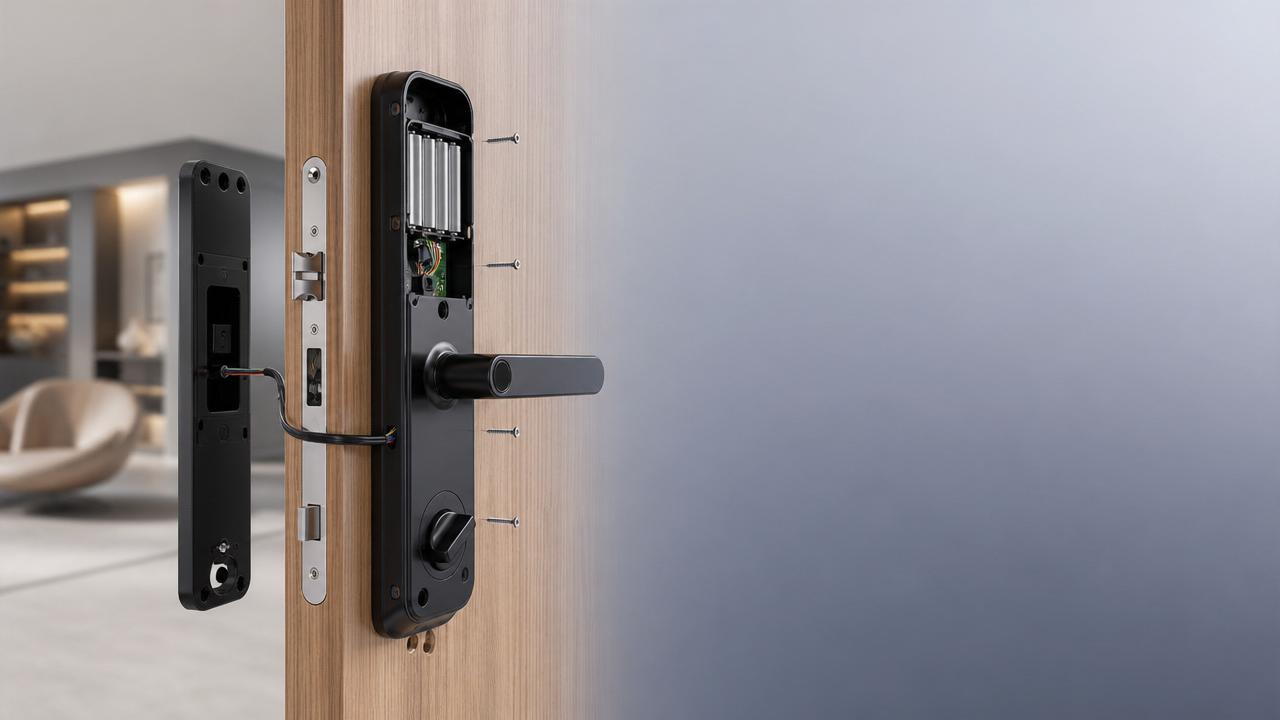
This smart locks installation guide helps prevent the small mistakes that often turn into lockouts, weak security, and expensive rework. A smart lock looks simple from the outside, but reliable performance depends on wiring, door fit, power, app setup, and everyday use conditions.
In both homes and commercial interiors, installation quality matters as much as product quality. GIAM closely tracks how smart access systems fit into modern building materials, interior finishes, and safer spatial design, so practical installation decisions should always match the door, traffic level, and environment.
Start with the door before touching the lock
Most smart lock problems begin at the door, not in the software. If the slab drags, the latch binds, or the strike plate sits too tight, even a high-end system will feel unreliable.
- Check door thickness, backset, and bore hole size before opening the box. A mismatch here causes forced fitting, unstable mounting, and long-term alignment trouble.
- Close the door slowly and test latch movement by hand. If it catches without the lock installed, the door frame needs correction first.
- Measure frame squareness and hinge condition. A sagging door often creates false lock issues, especially when auto-lock functions engage too early.
- Confirm whether the door is wood, metal, glass-framed, or composite. Different materials affect drilling accuracy, screw hold, and cable protection.
- Review fire-rating or access compliance before modification. In commercial spaces, the wrong drilling pattern can affect both safety standards and warranty validity.
This is where a smart locks installation guide becomes useful in real life. It keeps attention on fit tolerance, not just the lock body or mobile app.
Why door fit matters more than many expect
A smart lock motor is designed to assist locking, not to force a warped door into place. If the latch meets resistance, battery drain rises, noise increases, and failed locking events become more common.
GIAM’s focus on building materials and space performance also supports this point. Better installation outcomes often come from matching the lock to actual door conditions, surface finish durability, and traffic patterns.
Pay close attention to wiring and power details
Not every smart lock needs hard wiring, but models with gateways, intercom links, or access control integration often do. Wiring mistakes are easy to hide during installation and hard to diagnose later.
- Route cables through the door carefully and avoid pinching near the escutcheon. A compressed wire may still work briefly, then fail after repeated opening cycles.
- Match voltage, polarity, and connector type exactly to the manufacturer’s instructions. One small wiring assumption can damage the board or disable pairing.
- Separate low-voltage lock wiring from sources of electrical interference when possible. This reduces unstable communication in connected commercial access environments.
- Install fresh, approved batteries at setup instead of using old stock. Weak power often causes false fault messages and incomplete calibration.
- Leave service slack where allowed, but keep wiring neat. Tight cable paths strain connectors, while loose routing increases wear inside the door cavity.
A good smart locks installation guide treats power like a security issue, not just an electrical detail. Stable power supports stable locking, logging, alerts, and remote control.
The common setup mistake after wiring
Many installers power the unit before checking cable seating, spindle direction, and latch movement. That creates confusing symptoms. The lock may beep, light up, and still fail basic lock and unlock cycles.
Avoid the installation errors that show up every day
The most common mistakes are usually simple. They happen when the job moves too fast or when the lock is treated like a standard mechanical replacement.
- Do not overtighten mounting screws during final assembly. Too much pressure can distort the interior plate and affect keypad response or thumb-turn smoothness.
- Set handing direction correctly during initial programming. A wrong left-right setting often makes the motor behave unpredictably even when the lock is physically installed well.
- Align the strike plate so the latch enters freely without pushing the door. Smart locks perform best when the door closes naturally under light pressure.
- Complete firmware updates before issuing final user credentials when possible. Early software mismatches can create access confusion and duplicate troubleshooting.
- Test manual key override before project handover. It is often forgotten, yet it becomes critical during low battery events or connectivity interruptions.
- Record master codes, admin settings, and reset steps securely. Losing control credentials can turn a finished installation into a full reconfiguration job.
A quick reference table for field checks
Set up the app and user permissions carefully
A lock can be physically perfect and still fail in daily use if setup is rushed. That is why every smart locks installation guide should include digital commissioning, not just hardware steps.
- Create the primary account on the correct device before sharing access. Switching ownership later can be messy, especially in managed apartments or office units.
- Confirm Wi-Fi, Bluetooth, or hub range at the door, not only in the same room. Signal loss at the frame can interrupt setup.
- Test every unlock method separately, including app, code, card, fingerprint, and key. A partial test leaves hidden failures for later discovery.
- Assign permissions by role and time where supported. This reduces casual code sharing and keeps access records more useful.
- Turn on low-battery alerts and event notifications during setup. These basic settings improve response time when something starts going wrong.
In mixed-use and commercial interiors, digital setup affects security governance as much as the lock cylinder once did. That aligns with GIAM’s broader view of smart spaces, where hardware, software, and operational discipline work together.
Watch for differences between residential and commercial spaces
In a home, convenience usually leads the conversation. In a commercial setting, the priorities often shift toward access logs, durability, turnover speed, and compatibility with broader building systems.
A residential door may tolerate a simpler installation path. A lobby, meeting room, rental unit, or staff entrance usually needs tighter checking for cycle frequency, surface wear, and backup access procedures.
For homes and private units
Focus on smooth latch action, battery access, and easy recovery if the phone is unavailable. Fingerprint placement height and keypad visibility also matter more than many expect during daily use.
For shared or higher-traffic interiors
Check user turnover, cleaning chemicals, door closer force, and audit needs. These details influence finish durability, reader performance, and how often credentials must be updated or removed.
Do a final handover test before calling the job complete
Many callbacks happen because the lock was installed, but not truly commissioned. A final test should feel like real use, not a quick button press while the door stands open.
- Open and close the door repeatedly with all lock methods active. This reveals fit problems that do not appear during bench-style testing.
- Test locking with the door fully shut and the frame under normal pressure. Some issues appear only when seals and closers engage.
- Verify emergency access steps in a realistic order. Include battery warning response, mechanical override, and admin reset instructions where applicable.
- Clean fingerprints, metal shavings, and drilling dust before handover. Fine debris near sensors, contacts, or bolt channels can affect early performance.
- Document model details, install date, battery type, and settings used. Good records simplify maintenance and future upgrades across multiple spaces.
A practical smart locks installation guide is really about reducing avoidable friction. When the door fits well, wiring is protected, setup is complete, and testing reflects real use, the lock performs the way it should.
For better results, start with the physical door, move carefully through power and setup, and only finish after full-use testing. That approach supports safer living, cleaner project delivery, and smarter spatial performance across modern interiors.
Industry Briefing
Get the top 5 industry headlines delivered to your inbox every morning.